

Discussion Board
Pawtograder’s discussion board feature allows students and staff to discuss course content and ask questions. It is not intended to be a replacement for office hours, although there is an option to format the post as a question that needs an answer (as opposed to a “note” that does not need an answer).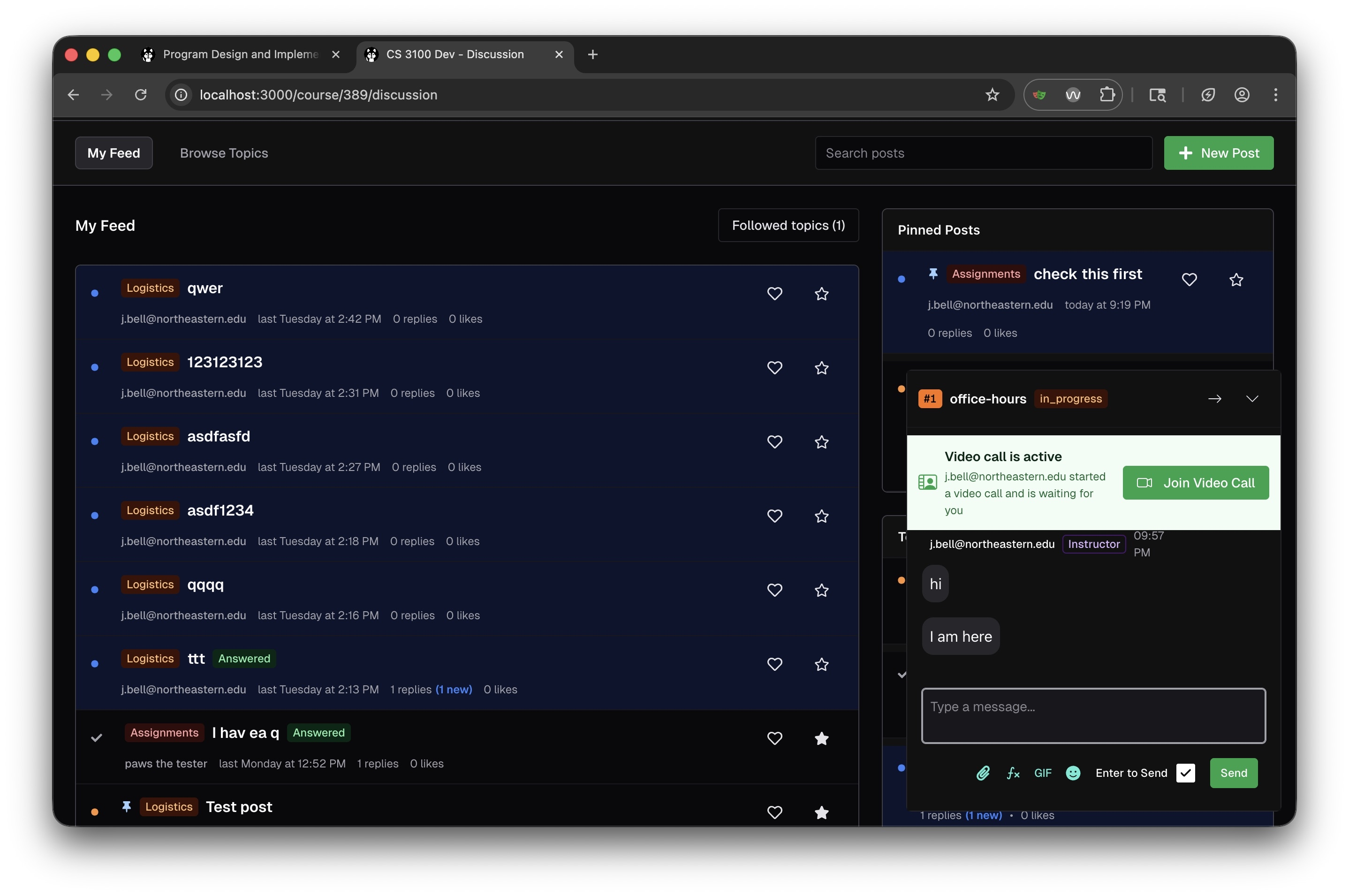
Key Features
Feed and Topic Organization
The discussion board uses a feed-based layout with two main views:- My Feed: Shows all posts relevant to you, including posts from topics you follow
- Browse Topics: Allows you to explore posts organized by topic categories
Pinned Posts
Instructors can pin important posts that appear in a dedicated “Pinned Posts” section in the sidebar. This is useful for:- Highlighting frequently asked questions
- Surfacing important announcements
- Drawing attention to helpful resources
Post Visibility and Identity
Posts can be shared with the entire class, or with course staff only. Each user in a class has a pseudonym, and can choose to use their real name or their pseudonym. Staff can always see the real name of a user. Students can edit their own posts, and staff can edit any post.Post Metadata
Each post displays:- Topic tag: Color-coded category (e.g., “Logistics”, “Assignments”)
- Author email: The poster’s identity
- Timestamp: When the post was created
- Reply count: Number of responses, with indicators for new replies
- Like count: Community engagement metric
- Answered badge: Indicates whether a question has been resolved
Active Help Request Integration
When a student has an active help request in office hours, a widget appears in the discussion board sidebar showing:- The current status of their help request (e.g., “in_progress”)
- Video call notifications when staff starts a video chat
- A “Join Video Call” button for quick access to help sessions
Drag-and-Drop Image Uploads
The discussion board supports drag-and-drop image uploads, making it easy for students and staff to share screenshots, diagrams, and other visual content. Simply drag an image file into the post editor to upload it.Karma System
The discussion board includes a karma system that rewards helpful contributions. Students earn karma points by:- Creating helpful posts that receive likes
- Providing answers that are marked as solving questions
- Engaging constructively with the community